📨
How to Connect with Open VPN
Description
Follow these steps to connect to the OpenVPN network from your Windows computer:
1. Open OpenVPN GUI: The OpenVPN GUI will appear in the Windows task list. Right-click the icon and click “Connect”.

2. Enter Username and Password:
Most of the time, your username is the first part of your email address. For example, if your email is test@slashopt.eu, your username will be test.
Your password is usually the same as the one used to log in to your computer and email.
THIS IS NOT ALWAYS THE CASE. You might have been instructed otherwise. If you have trouble logging in to the VPN, please contact customer support.

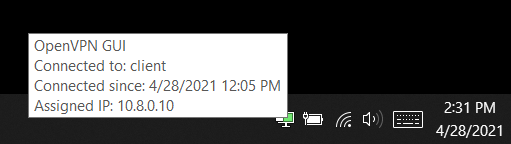
Once connected successfully, you should see the connection status screen below: